
Arthur Queffelec
Monday, February 23, 2026 | 11 minutes
Building a Basic PDF Semantic Search Engine
Introduction
Hi there!
While reading the state of the art of Retrieval Augmented Generation (RAG), I realized that I wanted to experiement with some bleeding edge techniques that I had read about. In order to do so, I needed a simple project to build on top of. While reading Generative AI with LangChain, I thought, “I wish I could ask questions about this book” and I guess that was the spark that ignited this project.
And, of course, as I love to make GenAI as mobile as possible, I decided to build a simple PDF semantic search engine that could be used in browser and would allow me to easily extend it. So, like the previous project, this is fully running in the browser, without any backend, is open source, and ensures privacy.
In this article, I will show you how you can build the simplest PDF semantic search engine using LangChain that will be the stepping stone for more complex RAG projects.
Retrieval
It’s important to note that before we even consider the ‘Generation’ part of RAG, we need to build the ‘Retrieval’ part. This is where the semantic search engine comes into play. The idea is to create a system that can understand the content of a document and retrieve relevant information based on a query.
Why Retrieving?
An LLM, as big as it is, doesn’t properly ‘know’ anything. It has been trained to predict the next token based on the previous ones, but it doesn’t have a true understanding of the world. I like to see an LLM as a very powerful parser. Historically, transformers have been created for translation tasks, and while they have been adapted to many other tasks, they still remain fundamentally a tool for ’transforming’ data. Pun intended.
So, when we want an LLM to answer a question, the best way for it to get it right is to allow it to ‘see’ the right answer. However, we cannot shove the entire knowledge of the humanity into it’s context window, and even if we could, it’s attention mechanism is limited, so it would even struggle to find the right information in that sea of data.
This is where retrieval comes in. By retrieving the most relevant information and providing it as context to the LLM, we can significantly improve the quality of the generated response.
How Retrieval Works
So, let’s ignore generation for now, the problem we try to solve is: “Given a document and a query, how can we select the most relevant parts of the document to answer the query?”
Information retrieval is a well-studied problem in the field of Natural Language Processing (NLP). There has been many techniques to achieve this. However, the breakthrough in this field has been the use of embeddings. Indeed, while neccesary for LLMs, embeddings have also revolutionized the way we do information retrieval.
By using embeddings, we can project a piece of text into a high-dimensional space where semantically similar pieces of text are close to each other.
For the sake of simplicity, imagine a giant 3D map, where every concept has a specific coordinate:
- “Apple” and “iPhone” would be close to each other.
- “Apple” and “Pear” would also be close, but in a different ‘direction’.
- “Apple” and “Nuclear Physics” would be miles apart. (But potentially closer than “Nuclear Physics” and “Pear”, thanks to Newton!)
Interestingly, the plane in which “Apple” and “iPhone” would be close might very much be the same as the plane on which “Raspberry” and “Pi Zero” would be close, which is pretty cool.
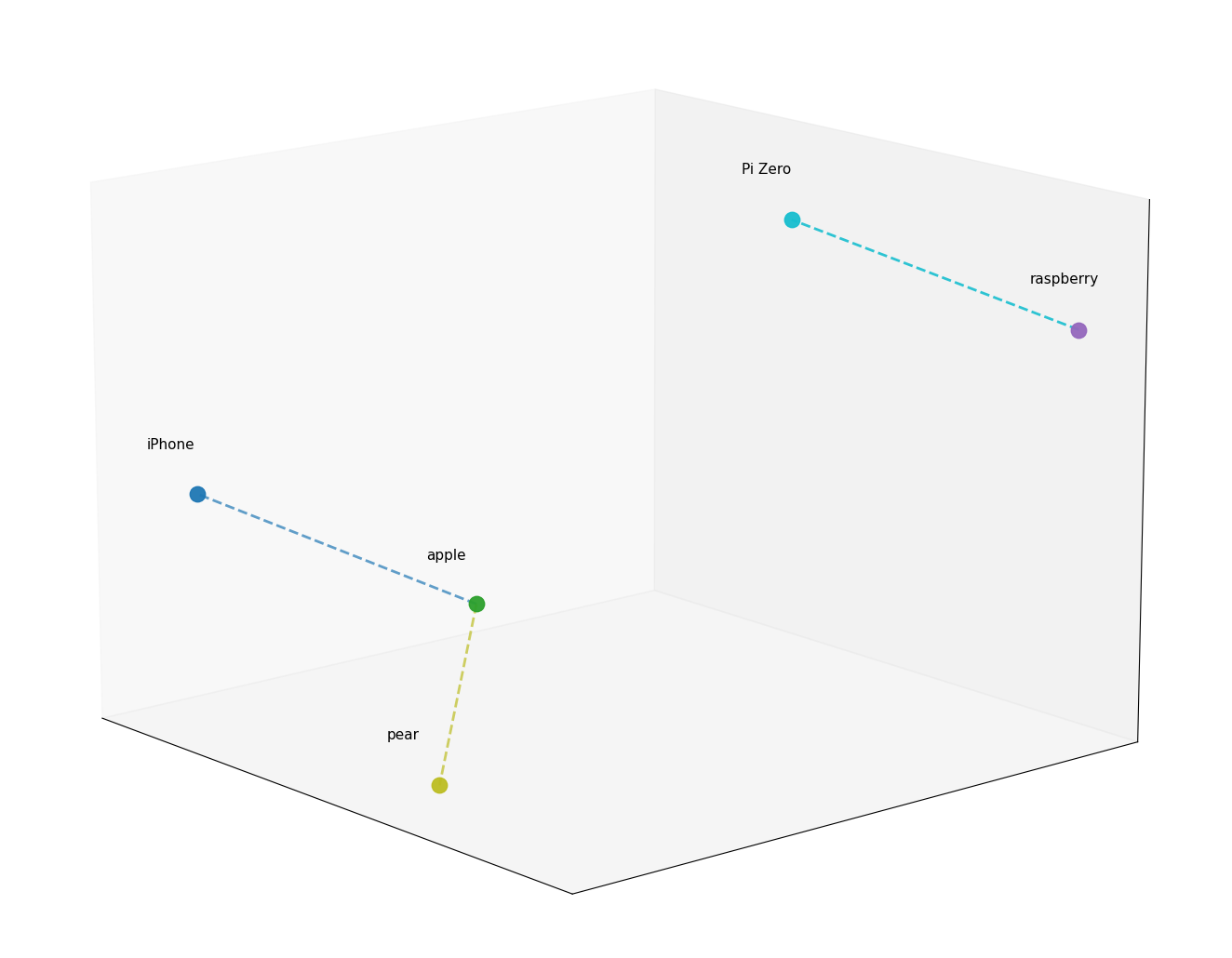
Now, let’s say we plot the entire content of a document on this map. When we have a query, we can also plot it on the same map and look for the closest points to it. Those points will correspond to the most relevant parts of the document.
PDF Semantic Search Engine
The Pipeline
Alright, now that we understand the concept of retrieval and roughly how embeddings work, let’s see how we can build a simple PDF semantic search engine using LangChain.
Here is the high-level pipeline we will follow:
- PDF Parsing: We will use a PDF parser to extract the text from the PDF document.
- Text Chunking: We will split the extracted text into smaller chunks that can be processed by the embedding model.
- Vector Store Creation: We will use an embedding model to generate embeddings for each chunk of text and store them in a vector database.
- Retrieval: When a query is made, we will generate an embedding for the query and retrieve the most relevant chunks from the vector database based on cosine similarity.
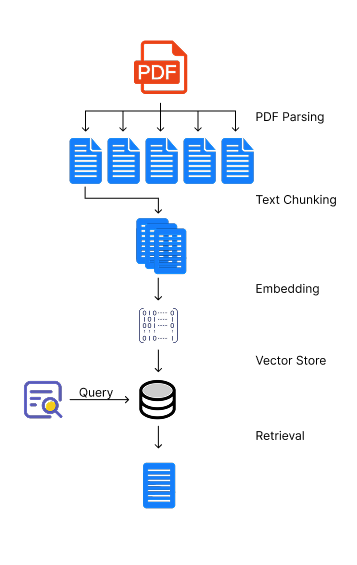
Note that the following code is simplified for the sake of clarity and is not production-ready. It is meant to illustrate the concepts and the pipeline. You can find the full code in the GitHub repository.
PDF Parsing
Let’s start with the PDF parsing. We will use the WebPDFLoader from the @langchain/community package to load and parse the PDF document.
import { WebPDFLoader } from "@langchain/community/document_loaders/web/pdf";
import type { Document } from "@langchain/core/documents";
import * as pdfjs from "pdfjs-dist/build/pdf.mjs";

export async function loadPdfAsDocuments(file: File): Promise<Document[]> {
  const loader = new WebPDFLoader(file, {
    pdfjs: async () => pdfjs,
    splitPages: true
  });

  return loader.load();
}
Text Chunking
Note: Chunking is a whole art of its own. The way you chunk your text can have a significant impact on the performance of your retrieval system. It’s important to experiment with different chunking strategies to find the one that works best for your specific use case.
For our simple semantic search engine, we will use the CharacterTextSplitter from the @langchain/textsplitters package, which allows us to split the text based on a separator, a chunk size and an overlap.
import { CharacterTextSplitter } from "@langchain/textsplitters";
import type { Document } from "@langchain/core/documents";

export async function chunkDocuments(documents: Document[]): Promise<Document[]> {
  const splitter = new CharacterTextSplitter({
      separator: config.fixed.separator,
      chunkSize: config.fixed.chunkSize,
      chunkOverlap: config.fixed.chunkOverlap
    });
    return splitter.splitDocuments(documents);
}
The chunk size can be important depending on the type of documents. However, it’s worth noting that you will be limited by the maximum input size of the embedding model you are using. The overlap is necessary because it allows us to maintain some context between the chunks, which can be crucial for the retrieval step.
Embeddings
For the sake of building a in-browser semantic search engine, we will use the Xenova/all-MiniLM-L6-v2 model, which is a small and efficient model that can run in the browser using the @xenova/transformers library. We will create a custom Embeddings class that uses this model to generate embeddings for our text chunks.
import { Embeddings } from "@langchain/core/embeddings";
import { env, pipeline, type FeatureExtractionPipeline } from "@xenova/transformers";

const DEFAULT_MODEL = "Xenova/all-MiniLM-L6-v2";

export class BrowserTransformersEmbeddings extends Embeddings {
  private extractor: FeatureExtractionPipeline | null = null;

  constructor(private readonly model: string = DEFAULT_MODEL) {
    super({});
    env.allowLocalModels = false;
  }

  private async ensureExtractor(): Promise<FeatureExtractionPipeline> {
    if (!this.extractor) {
      this.extractor = await pipeline("feature-extraction", this.model);
    }

    return this.extractor as FeatureExtractionPipeline;
  }

  async embedDocuments(texts: string[]): Promise<number[][]> {
    return Promise.all(texts.map((text) => this.embedQuery(text)));
  }

  async embedQuery(text: string): Promise<number[]> {
    const extractor = await this.ensureExtractor();
    const result = await extractor(text, { pooling: "mean", normalize: true });

    return Array.from(result.data as ArrayLike<number>);
  }
}
It’s pretty straightforward. We create a feature extraction pipeline using the model, and then we use it to extract the features from the text. Embedding a document is simply embedding every chunk of text in the document.
Note: In the extractor, we use mean pooling and normalization to get a single embedding vector for the entire text chunk.
Vector Store Creation
Now that we can embed a document, we need to store it into a database that allows us to efficiently retrieve similar embeddings. For this simple semantic search engine, we will use the MemoryVectorStore from the langchain/vectorstores/memory package, which is an in-memory vector store that allows us to perform exact, linear search for the most similar embeddings. The default similarity metric is cosine similarity, but can be changed.
Note: While the
MemoryVectorStoreis enough for our purpose, it is worth noting that a linear search can be quite inefficient for large datasets. For larger datasets, you might want to consider using a more advanced vector store that implements an approximate nearest neighbor search algorithm, such as HNSW or FAISS.
import type { Document } from "@langchain/core/documents";
import type { Embeddings } from "@langchain/core/embeddings";
import { MemoryVectorStore } from "langchain/vectorstores/memory";

export async function createVectorStore(
  documents: Document[],
  embeddings: Embeddings
): Promise<MemoryVectorStore> {
  const store = new MemoryVectorStore(embeddings);
  await store.addDocuments(documents);

  return store;
}
Note: As for the chunking strategy, the choice of the vector store can also have a significant impact on the performance of the retrieval system. I highly recommend to explore the different vector stores available in the LangChain ecosystem.
Retrieval
Finally, we can implement the retrieval step. When a query is made, we will generate an embedding for the query and retrieve the most relevant chunks from the vector database based on cosine similarity.
import type { Document } from "@langchain/core/documents";
import type { MemoryVectorStore } from "langchain/vectorstores/memory";

export function createRetriever(vectorStore: MemoryVectorStore) {
  return vectorStore.asRetriever(2);
}

export async function queryWithRetriever(
  retriever: ReturnType<typeof createRetriever>,
  query: string
): Promise<Document[]> {
  return retriever.invoke(query);
}
Evaluation
There are many parameters that one can play with in order to improve the retrieval performance. First, it is worth noting that the chunking strategy can have a significant impact on the perfomance depending on the type of documents you are working with. Additionally, the choice of the embedding model can also dramatically change the results. It’s worth experimenting with different models to see which one works best for your specific use case. We didn’t talk about other retrieval techniques, such as using a more advanced vector store or implementing a more complex retrieval algorithm, but those are also worth exploring.
That being said, let’s try it out and see how it performs on “Generative AI with LangChain.” For the following examples, I will be using a chunk size of 400 characters with an overlap of 100 characters.
Query: “What is the difference between zero shot prompting and few shot prompting?”
. The best example of using a placeholder
is to input a history of a chat, but we’ll see more advanced ones later in this book when we’ll talk
about how an LLM interacts with an external world or how different LLMs coordinate together
in a multi-agent setup.
Zero-shot vs. few-shot prompting
As we have discussed, the first thing that we want to experiment with is improving the task de-
scription itself
The retrieved chunk is pretty relevant and would send us to the right page. However, it doesn’t contain the answer to the question.
Query: “How can I summarize a long video?”
Appendix
432
Summarizing long videos
ln Chapter 3, we demonstrated how to summarize long videos (that don’t fit into the context
window) with a map-reduce approach. We used LangGraph to design such a workflow. Of course,
you can use the same approach to any similar case – for example, to summarize long text or to
extract information from long audios
The retrieved chunk is not bad, but it doesn’t point directly to the answer. This is common problem known as hubness, where introductions, conclusions, table of contents and other ‘generic’ chunks tend to be retrieved more often than the more specific ones. There exist some techniques to mitigate this problem, such as re-ranking the retrieved chunks or using a more advanced retrieval algorithm or ensemble methods which combine the results of multiple retrieval algorithms.
Query: “How does HyDE work?”
. How does climate change affect the environment?
3. What are the consequences of climate change?
A more advanced approach is Hypothetical Document Embeddings (HyDE).
Hypothetical Document Embeddings (HyDE)
HyDE uses an LLM to generate a hypothetical answer document based on the query, and then
uses that document’s embedding for retrieval
The retrieved chunk is prefectly pointing to the answer. However, it’s worth noting that it also contains some irrelevant information, which is common when using a basic text splitter. A more advanced chunking strategy, such as a semantic chunker, could potentially help with this issue.
Live Demo
Future Improvements
This was a very simple implementation of a PDF semantic search engine, and there are many ways to improve it.
Minor improvements to the retrieval step could include:
- Hybrid Search: Combine semantic search with traditional lexical search to improve retrieval performance.
- Re-ranking: Implement a re-ranking step after retrieval to further improve the relevance of the retrieved chunks.
- Query Transformation: Use an LLM to transform the query into a more effective form for retrieval.
- HyDE (Hypothetical Document Embeddings): Generate hypothetical answers to the query and use their embeddings to improve retrieval.
- Contextual Compression: Implement a contextual compression step to reduce the size of the retrieved chunks while maintaining their relevance.
- Score Attribution: Implement a score attribution mechanism to understand which parts of the retrieved chunks are contributing the most to the final answer.
- Self-Consistency: Implement a self-consistency mechanism to improve the robustness of the generated answers.
Major improvements could include:
- Corrective RAG: Implement a corrective RAG that addresses the issue of irrelevant, insufficient, or missleading retrieved information by explicit evaluation and correction of the retrieved information.
- Agentic RAG: Implement an agentic RAG that can decide when to retrieve, what to retrieve, and how to use the retrieved information in a more dynamic and flexible way.
Call to Action
Go checkout the code on GitHub, give the app a try, and feel free to reach out with questions or feedback. I’d love to hear what you build with it!
License
My code is open source under the MIT License.